Plan
vulcan plan shows you what changed, what will be recomputed, and what will be promoted into an environment's virtual layer before changes take effect.
Vulcan plan tracks changes to:
- Semantics and metrics (keeps business definitions consistent)
- Assertions, checks, and profiles (keeps data quality visible and predictable)
- Model SQL and Python (transformation logic)
Quick start
Create a plan:
If you omit the environment name, Vulcan plans against prod.
What you'll see in a plan
A plan summary includes:
- What changed: added/removed/direct/indirect/metadata updates across models and related definitions
- Impact classification: breaking vs non-breaking (auto-identified)
- Backfill window: which models need intervals executed
- Apply stages: executing model batches, updating virtual layer, running non-blocking quality signals
For a walkthrough with screenshots and CLI snippets, see Plan. For details on environments, snapshots, forward-only plans, and restatements, see Plans.
How plan works
Vulcan follows this flow:
-
Diff scope: Compare local project state to the target environment (models, standalone assertions, semantics, metrics, checks, metadata).
-
Plan type: Determine whether this is a backfill plan or a virtual update (and whether forward-only or restatement options apply).
-
Categorize impact: Auto-identify breaking vs non-breaking and propagate impact to indirectly impacted objects.
-
Compute intervals: Compute the time ranges that must be executed.
-
Apply: - Create model variants (snapshots) - Execute model batches (backfill) if needed - Update the virtual layer (promote) - Run non-blocking quality signals (checks and profiles)
Change types
Vulcan reports changes using consistent categories. You'll see these for models, and often for semantics, metrics, checks, and assertions.
- Added: exists locally, not in the environment (new object will be created/registered).
- Removed: exists in the environment, removed from local project (will be removed from the environment).
- Directly modified: you edited the object itself (model SQL/Python, semantics YAML, check YAML, Assertion SQL).
- Indirectly impacted: You didn't edit the object, but something it depends on changed. Common for downstream models, and for semantics, metrics, checks that reference a changed model or column.
- Metadata-only: description/tags/ownership/config changes that don’t require historical recomputation.
Example
You rename a column in sales.daily_sales.
sales.daily_salesis directly modified- Downstream models are indirectly impacted
- A metric or check referencing the renamed column is indirectly impacted. It may fail validation until you update it.
Change categories (breaking vs non-breaking)
Vulcan identifies breaking vs non-breaking automatically during plan creation (and may prompt only in ambiguous cases).
Breaking
Breaking means the change can alter results in a way that downstream models and consumers must reflect.
- For models: Backfill cascades downstream. More expensive, but safest.
- For semantics, metrics, checks: Definitions may become invalid or meaningfully change for consumers.
Example
Adding/modifying a filter changes the set of rows produced:
Non-breaking
Non-breaking means the change is additive or non-functional in a way that doesn't invalidate downstream dependencies.
- For models: Only the directly modified model needs backfill.
- For semantics, metrics, checks: Additive updates (new metric, new check, updated description) don't break existing consumers.
Example
Adding a new column is usually non-breaking:
Snapshots (model variants) and fingerprinting
Whenever a model definition changes, Vulcan creates a snapshot: a record of that model at a point in time. A snapshot contains everything needed to evaluate and render the model query, including macro definitions and global variables at the time the snapshot was created, and it tracks which time intervals have data.
Snapshots have unique fingerprints derived from their models. Vulcan uses fingerprints to decide whether an existing physical table can be reused or whether the model must be backfilled. Vulcan understands SQL, so superficial edits like formatting won't generate a new fingerprint.
Physical tables, virtual layer, and environments
How these components work together:
- Physical layer: Versioned physical tables hold the data for a specific snapshot.
- Virtual layer: Environment views point to the correct physical tables.
- Environment: A set of references to model snapshots (and therefore to physical tables).
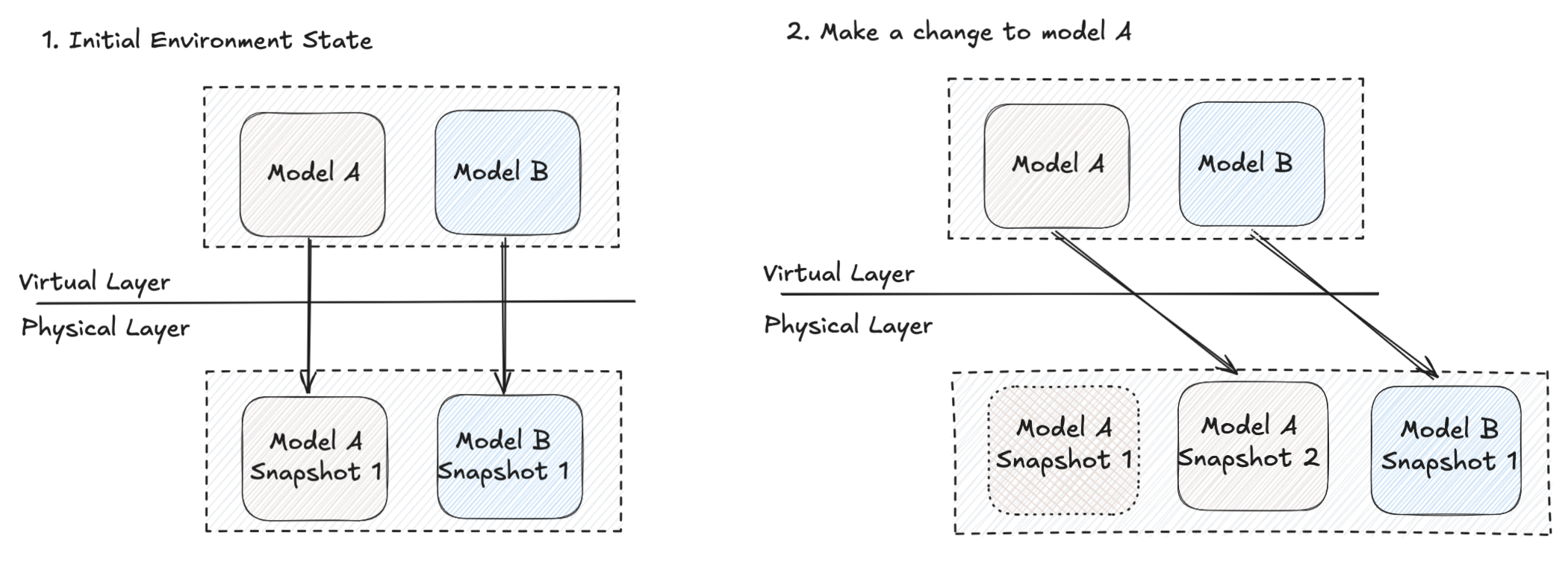
Backfill vs virtual update
- Backfill: Vulcan executes intervals to populate the physical tables for new snapshots.
- Virtual update: Vulcan only swaps references in the virtual layer (no new execution needed).
Start/end dates (non-prod) and limitations
In non-prod environments, you can control the backfill window:
Some model kinds are inherently non-idempotent (for example INCREMENTAL_BY_UNIQUE_KEY, INCREMENTAL_BY_PARTITION, and SCD variants). In those cases, Vulcan may compute a preview for a limited range that can’t be reused when deploying to production.
If your specified window is smaller than a model’s interval size, the model may be skipped; use --min-intervals to force at least N intervals.
Restatement plans (--restate-model)
Restatement is how you reprocess existing data for a time range even when the model definition hasn’t changed (for example, upstream data was corrected or you want to re-run a subset of history).
No local changes allowed
Restatement plans ignore local file changes. They can only restate model versions already present in the target environment.
How it works:
- Cascading backfill: selected models and downstream models are reprocessed.
- Selectors: Select by name, wildcard, or tag. See Model selection.
- External models: restating an external model triggers downstream backfills (the external model itself is metadata-only).
- Disable restatement: set
disable_restatement: trueto prevent restatement for a model.
Prod vs dev behavior differs. Restating prod can clear affected intervals in other environments' state to prevent stale data being promoted later. For details, see Plans.